As I mentioned in my last post I started working on a small sprite editor in order to make it easier for me to jump in and out of development on my C64 (or C128…) in Turbo Macro Pro. And now I think it’s time to share my nonsense with the world.
Announcing the release of Minisprite 1.0. First of all you can download it from my site right here. And just to really live in the old-school, I also uploaded it to the BBS I’ve been on the most recently, The 13th Floor (bbs.hoyvision.com:6400). I can’t link directly to it, but it’s in the Uploads/Downloads sections, under Tools and Editors. If you have any suggestions for good C64 BBSs that I need to check out please let me know!
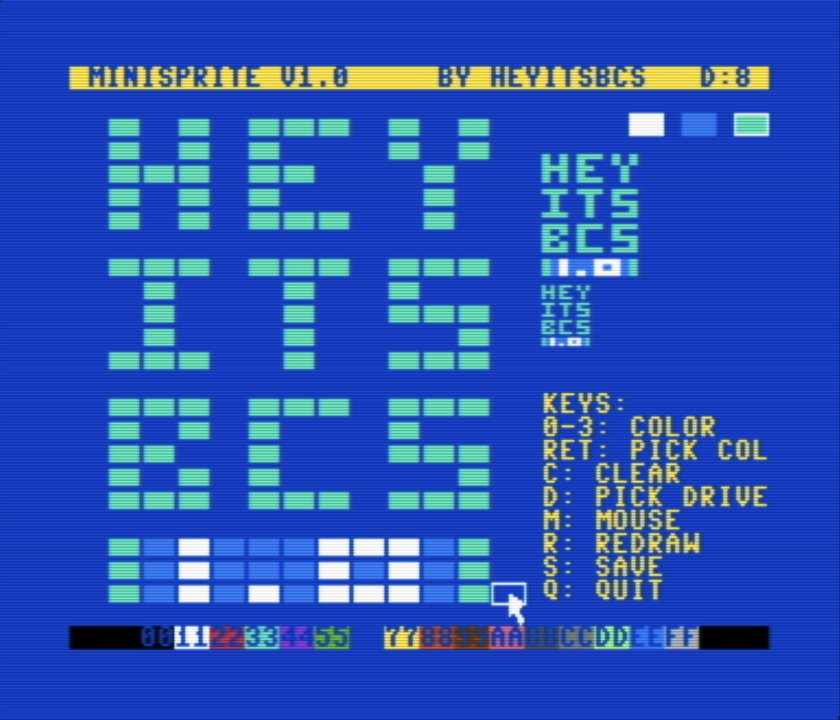
While it’s pretty similar to what was shown before there are a few notable differences.
First, you’ll notice we have mouse support! If you plug a 1351 mouse (or compatible) into port 1 and press the M key you’ll get mouse support. It’s pretty basic, move over the cell you want to draw on and left-click to draw with the currently selected color. Right-clicking will instead clear the cell by drawing color 0 to that location. I have to give credit to a wonderful blog post and github repo by Gregory Nacu, creator of C64os as it was the basis for my implementation (which, to be honest, borrows pretty liberally from the code he shared). Some small difference between my initial implementation and his sample made all the difference and until I have the time to figure out why, the borrowed code it is.
Other than that it was just some nice cleanups. You can hit the R key to force a redraw if that’s needed for any reason. The Q key cleanly quits back to basic (previously you had to Run/Stop+Restore). And probably most it now tells you if there was an error opening the file for saving (most likely caused by having the wrong drive selected, see the D:# in the header bar on top), which it does at least try to default to the drive you’re actively using.
So how does it work?
I also recorded a little video that’s a combination release announcement, and sample of the workflow I developed this to be used in:
This is a super simple example of me throwing together a new small “project” (I use that term VERY loosely) jumping between Turbo Macro Pro and Minisprite as I develop it. Maybe a tool this simple already existed and I just wasn’t aware of it, but if not, now it does!
TL;DR
Minisprite 1.0 is out for the C64 here and you can see a short video of how I use it here.