Cozy C64 vibes
So I said in my happy new year post that I was looking to do some more retro projects. At the time I was debating between a C64 game or a Gameboy Color game. I’m happy to say I decided to go with C64 for the simple reason that I love that I can make games for the C64 WITH the C64. It really just fully encapsulates the retro vibe for me. In fact, I’m trying to do this as authentically as possible (other than, you know, using a version of Turbo Macro Pro that was released in 2006, slightly past when the C64 was a viable machine). It’s just me, my C64c connected to my Checkmate Display, loading and saving all programs and code on my trusty 1541-II drive, with a warm cup of hot cocoa by my side. Yes, I’m going through a hot cocoa phase as a grown man, what of it? It’s cold here in Idaho and I’ve never been a fan of coffee.
Toolchain issues
Making a game on the C64 effectively requires 4 things.
- A way to write / assemble the code. For me, this is Turbo Macro Pro.
- A way to create graphics tiles for backgrounds. Currently I’m using a super limited tileset and have being going oh-so-retro and drawing them out in paper and manually entering them. This will change soon.
- A way to create sprites. The entire purpose behind this post.
- A way to create music and sound. I’m no expert here (or anywhere except the code I suppose) but am planning on using SidWizard for this.
Yes, easy to use tools exist on the PC for all of these things, but like I said, I want those cozy C64 vibes when doing this so I’m trying to do everything on the system itself. And that led me to the sprites. Sure there are existing sprite editors but I just hadn’t found one that was simple and quick enough to jump in, draw up a sprite real quick, and save it out in a way that I can easily include in my project’s code. That is, until I was watching random retro coding videos on YouTube (as one does at night) and came across a video talking about SpriteMagic. It was an old type-in-program from an old issue of Compute!’s Gazette. It seemed almost perfect. It sits in a set memory address waiting to be needed. And then with a keypress you could just have it create the DATA statements for BASIC created for you before exiting, and go right back to working on your BASIC program. That BASIC part is the “almost” in almost perfect. It had the workflow I wanted, just not the language support.
So I decided to write my own
Introducing Minisprite. A super basic C64 sprite editor meant to jump in and out of while also using Turbo Macro Pro for coding.
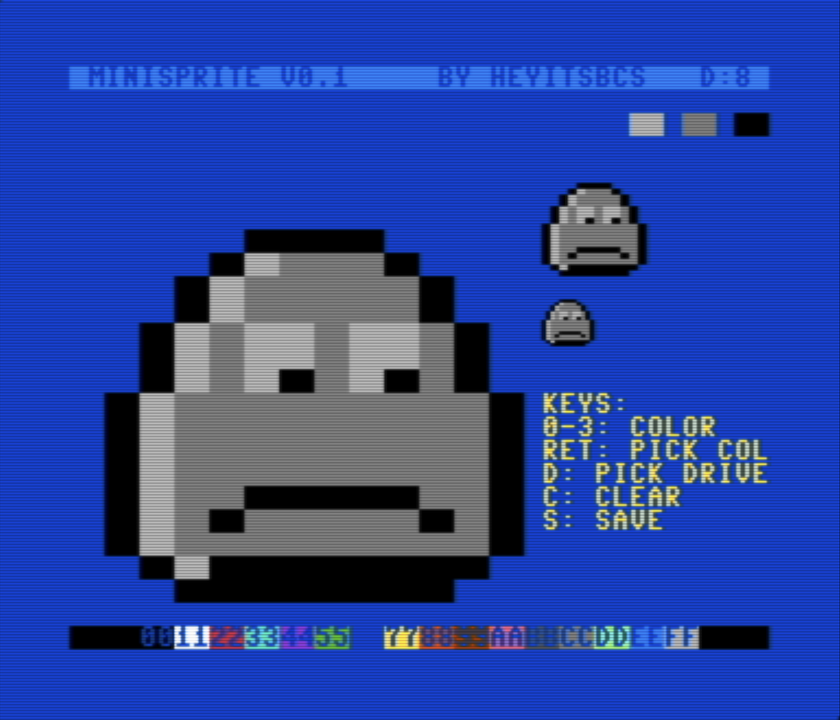 (screenshot captured in VICE since I don’t have a working capture at the moment…)
It shows the title bar (with currently selected drive to save to) on top. The main editor grid on the left. The currently selected 3 colors (for multicolor sprites) on the top right, and under that a double-sized and normal version of the sprite you’re editing. Then along the bottom the system palette. Is it pretty? No. But it’s functional.
Minisprite is assembled to memory address $1000. And TMP runs from $8000 (with source code in memory going down from there). To swap to my sprite editor I just hit back-arrow+1 to exit from TMP to basic (leaving TMP in memory) and then sys4096 and boom I’m in my sprite editor.
I create the sprite and hit the S key which will write out the .byte statements to a seq file on the drive I’ve selected. Then I jump back to TMP with sys32768 and can back-arrow+e to have it read in that file and add it to my source code. The goal in all of this is minimal friction. The easier I make it to create something, the more likely I actually am to create something.
So what’s next?
While I’m pretty happy with the workflow right now, I do have a few more improvements I want to make:
- Mouse support for drawing in addition to the current keyboard and joystick support.
- Toggling between multicolor and single color sprites (currently it’s only multicolor).
- Ability to specify filename (currently hardcoded to
spriteout). - Support for editing multiple sprites? Maybe? Need to determine how useful this is vs. the RAM cost that would eat into TMP / source code memory.
And then after that… well I have a few different ideas. For one, I may want to make a similar background tile editor. But that would likely be a bigger undertaking. Throwing some sprites around the screen is pretty easy and most sprites (at least in what I’m making right now) are self contained. But background tiles tend to need to blend in with other background tiles, which means I’d need to support a set of tiles. And that means having to swap off the character rom and setting my own tiles, while still keeping whatever I need for the super-basic UI. I’m just not sure it’s something I can make effectively enough within the ram limitations I’d have to still be able to jump back into TMP and continue writing code without risking running short on memory. Or maybe I’ll just be happy with my little sprite editor and go back to working on my game. And yes I know what I’m making. And yes I’ll be talking about it soon enough.